


Photomath
4.374.58K Reviews
App Specs
- Version
- 8.48.0
- Updated On
- License
- Free
- Downloads
- 100,000,000+
- Developer
- Google LLC
- Categories
- Education
- Platform
- Android, iOS
Screenshots
 Analysis by AppCompare
My first useful moment with Photomath would be a familiar one: I’m staring at a line of algebra, I can’t see how the next step follows, and I want more help than a final answer. The app is built around that gap between a problem and understanding its solution. I’d treat it as a study aid, not as a substitute for trying the work myself; that small distinction makes a big difference to how much I get out of it.
What to expect from a camera-based math helper
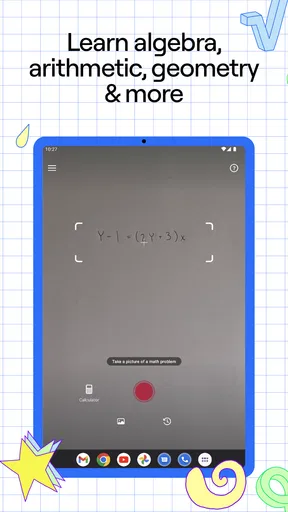
Photomath is an education app from Google LLC. Its basic idea is straightforward: use your phone to capture a math problem, then review a worked solution. That makes it appealing when copying a long expression by hand feels like a chore, but the camera is only the starting point. The real value is in using the result to check where your reasoning changed course or which operation you may have missed.
The app is free to download, with optional in-app purchases ranging from $0.99 to $29.99 per item. It is rated for Everyone, and the current version is 8.47.0, with Android 5.0 as the minimum OS. Its broad audience is reflected in its reach: it has more than 100 million installs, an average rating of 4.3 from around 3.1 million ratings, and about 75,000 written reviews. Those figures suggest it is widely used, but they don’t guarantee that every problem will scan cleanly or that every explanation will fit the way your class teaches a topic.
Guides and Analysis on Photomath
A reassuring first run
When you first open a camera-based solver, it helps to choose a simple, clearly written problem rather than the messiest one on the page. Hold the phone steady, make sure the full expression is visible, and check that the symbols on screen match what you intended to show. A faint minus sign, a cramped exponent, or a handwritten fraction can change the entire question, so I wouldn’t rush past that check.
If the captured expression looks wrong, adjust the framing or try entering the problem another way before trusting the result. This is a useful habit with any recognition-based math tool: the first answer is only meaningful if the app has read the same question you are trying to solve. Starting with a short equation also gives you a quick way to learn how the solution steps are presented before moving on to longer homework.
Turn the first answer into a lesson
For a first successful test, I’d solve a problem on paper before scanning it. Then I’d compare my working with the app’s steps, looking for the first place our methods differ instead of copying the last line. If the app shows a transformation I don’t recognize, I can pause there and ask what rule makes that move valid. That approach turns a quick check into a small practice session.
One practical trick is to cover the final answer while reading the working, then predict the next step yourself. It keeps the screen from doing all the thinking and reveals whether you understand the process or only recognize the result. When you’re studying for a test, try a similar problem without the camera afterward. If you can reproduce the method unaided, the help has done its job; if not, you’ve found a specific point to review.
Worth Reading Before You Choose

Baby Panda World Brings Quick Play to Modern Phones, but Its Game Library Feels Busy

ESPN’s Live Game View Makes Following Close Games Easier

QuizzLand Review: A Good Fit for Short Trivia Breaks, Not Every Player

Basketball Stars: Multiplayer Is Fast, but Can It Recover When Matches Go Wrong?

WEBTOON Turns Phone Updates Into a Better Reading Routine

Link to Windows Runs on Shared Habits, Not Social Feeds
Where it helps, and where I’d be cautious
In a normal homework session, I can imagine using it after attempting a question and getting stuck halfway through. I’d scan the expression, inspect the steps, and return to my notebook to finish a similar one by hand. A parent helping a child can use the same routine: ask the child to explain each transition rather than letting the displayed answer end the conversation. That makes the app more useful as a prompt for discussion than as an answer dispenser.
There are trade-offs. A camera can misread a handwritten mark, and symbols written close together may be ambiguous. Even a correctly recognized problem can have a solution path that doesn’t match the method a teacher expects students to practise. I would double-check the expression and compare the reasoning with class notes, especially when a sign, bracket, or exponent matters. For unfamiliar advanced material, a teacher or textbook may offer more context than a worked solution alone.
What Exactly is Photomath?
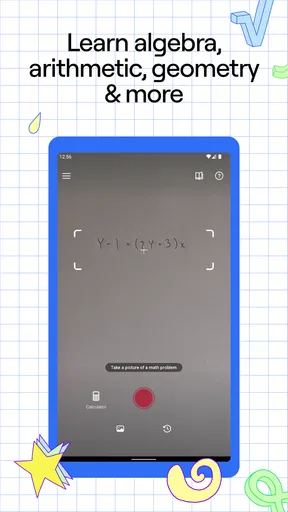
Imagine pointing your phone camera at a math problem and having the solution pop up instantly. That’s Photomath for you. It's as simple as snap, solve, and learn. You just take a photo of your handwritten or printed math problem, and the app does its magic, breaking down the solution step by step.
Features That Make It Shine
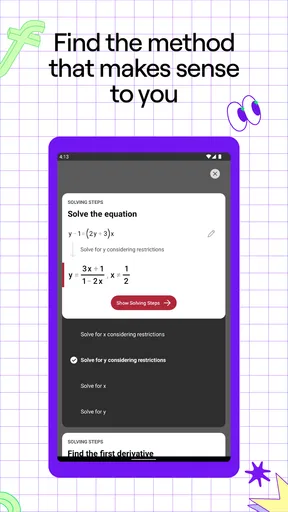
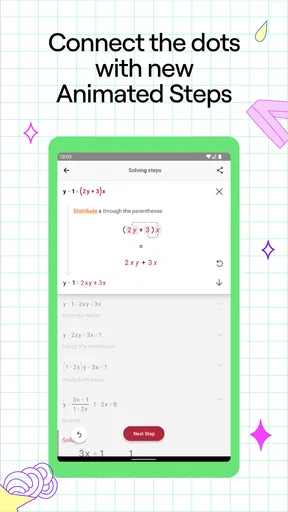
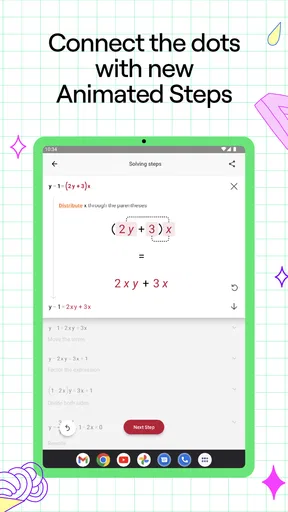
One of the coolest things about Photomath is its ability to provide a detailed breakdown of the solution. It doesn’t just give you the answer and walk away; it holds your hand through the process. You can see every step that leads to the solution, which is super helpful for understanding the concepts.
Another feature I love is the smart calculator. It’s not just any calculator; it’s one that understands what you’re trying to solve. You can tweak and change variables, and it adapts instantly, showing you new solutions.
"Learning math has never been this interactive and fun!"
Usability and User Experience
The interface is clean and intuitive. Even if you're not tech-savvy, you’ll find it easy to navigate. The app is pretty lightweight, so it doesn’t hog your phone's resources. Plus, it supports multiple languages, which is a nice touch for non-English speakers.
However, while Photomath works wonders with most problems, it occasionally struggles with more complex ones, especially those involving abstract symbols. But let’s be real, no app is perfect, right? It's still a fantastic tool for most high school and early college math problems.
Real-Life Applications
Picture this: you're in a math class, and the teacher writes a ginormous equation on the board that makes your head spin. Instead of panicking, you whip out Photomath, snap a pic, and voilà, you’ve got a step-by-step guide to solving it. It’s like having a cheat sheet, but one that actually teaches you something.
Parents can also use it as a learning tool for their kids. If your child is stuck on a homework problem, you can work through the solution together, helping them grasp the concept rather than just giving them the answer.
Choosing it over a textbook, calculator, or tutor
I see this as a useful middle ground between a basic calculator and a full lesson. A standard calculator is quicker for arithmetic and leaves the reasoning to you; a textbook explains a topic more broadly but can take longer to search; a teacher or tutor can respond to your exact misunderstanding. Photomath’s advantage is speed: it can put a worked path beside the problem you already have. Its limitation is that a worked path is not always the same as a complete explanation of why the method works.
That distinction matters if you are learning a new concept for the first time. I’d use the app to check a step, practise a familiar procedure, or spot a calculation slip, then turn to class materials when I need a definition, a diagram, or a different explanation. If the answer seems surprising, don’t assume the app is wrong or right immediately. First inspect the captured expression, then work through the transformation and verify the result independently where you can.
Make it part of a sensible study routine
A realistic evening routine might be to attempt a few homework questions on paper, mark the ones where you got stuck, and use the camera only on those. For each scanned problem, I’d write down the step that was confusing and then close the app before trying a similar question. This avoids the common trap of scanning every exercise and mistaking recognition for learning. It also keeps the phone from becoming the centre of the study session.
For parents, the most helpful question may be “What changed between these two lines?” rather than “What answer did it give?” That encourages a child to explain the operation in their own words. If the explanation does not make sense, compare it with the lesson notes together. The app can support a learning conversation, but it cannot tell you which classroom convention or notation the teacher wants unless you connect its steps to what the student has been taught.
Who will get the most from it
I’d recommend trying it if you are comfortable doing some work yourself and want a quick way to inspect a solution. It can suit students who need a nudge after getting stuck, adults brushing up on school-level math, and parents who want a concrete starting point when helping with homework. The step-by-step format is especially useful when the question is “How did it get from this line to the next?” rather than simply “What is the answer?”
I’d be less likely to rely on it if your main goal is to learn a whole subject from scratch, prepare for an exam without practising independently, or get feedback tailored to your exact reasoning. It may also be a poor fit when the handwriting is unclear or the notation is unusual. In those situations, a teacher, a careful textbook explanation, or a calculator paired with your own written method may be a better choice. The tool is most valuable when you already have a question and want help examining it.
Small habits that prevent misleading results
When a result looks off, I’d check the input before redoing the whole problem. Make sure the camera has the full expression, pay particular attention to minus signs and powers, and compare every visible symbol with the page. If a line is crowded or faint, rewrite it more clearly and try again. This is not busywork: a tiny recognition error can produce a perfectly consistent solution to a different problem.
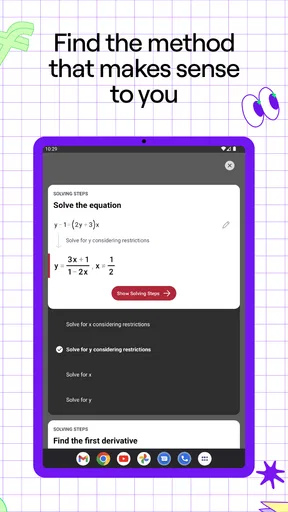
I’d also avoid treating one displayed route as the only valid route. In math, the same result can often be reached through different steps, and a classroom may emphasize a particular technique. Use the worked solution to understand one path, then check whether it connects to the method you are expected to practise. If it does not, that is a reason to consult your notes, not a reason to abandon your own learning process.
Final Thoughts
All in all, Photomath is more than just an app; it’s a learning companion that makes math less daunting and more accessible. It's free to download with optional in-app purchases, but even the free version packs a punch. So if you’re looking to make math a bit more bearable, give Photomath a whirl. You might just find yourself enjoying the numbers game.
Ready to give it a try? You can download it from the App Store or Google Play and start solving those pesky math problems today!
A final way to judge whether it is helping
After a few uses, I’d judge the app by what I can do without it, not by how quickly it produces a solution. Can I explain the key step? Can I solve a nearby example on paper? If so, it has served as a practical study companion. If I keep tapping through answers but cannot reproduce the method, I’d put the phone aside and return to a lesson or ask someone to walk me through the concept.
For a first-time user, that is the reassuring part: there is no need to turn every problem into a test of whether you can use the app perfectly. Start with one clear question, check that it has been read correctly, and use the steps as a guide to your own working. That is where this camera-based helper feels most worthwhile to me.
Pros
- Intuitive interface makes learning easy.
- Supports a wide range of math problems.
- Detailed step-by-step explanations.
- Offline mode for uninterrupted use.
- Regular updates with new features.
Cons
- Limited to math problem-solving only.
- Advanced problems may require premium.
- Doesn't support word problems.
- Occasional inaccuracies in solutions.
- Requires camera access for functionality.
FAQs for Photomath
What is Photomath and how does it work?
Photomath is a powerful educational app designed to help students solve math problems using their smartphone cameras. Users simply take a picture of a handwritten or printed math problem, and the app provides step-by-step solutions and explanations. It covers a wide range of topics, from basic arithmetic to advanced calculus, making it a versatile tool for learners at different levels.
Is Photomath free to use, or are there any premium features?
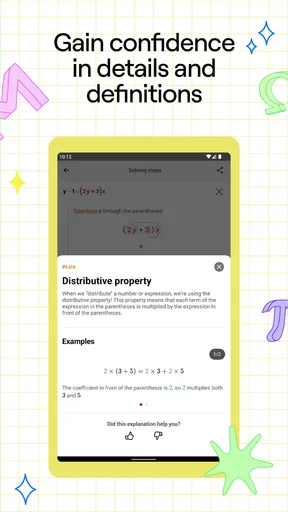
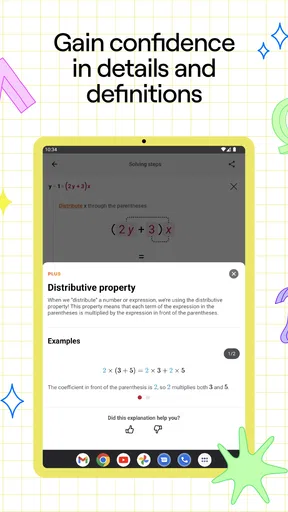
Photomath offers a free version that includes basic problem-solving features. However, for more comprehensive step-by-step explanations and additional learning resources, users can opt for the Photomath Plus subscription. This premium version provides deeper insights into problem-solving techniques, making it ideal for students who need extra help.
Which devices and operating systems are compatible with Photomath?
Photomath is available for both Android and iOS devices, ensuring a wide range of compatibility. Users can download the app from the Google Play Store or Apple App Store. It is designed to work smoothly on most smartphones and tablets, providing a user-friendly experience across different platforms.
Can Photomath solve any type of math problem?
While Photomath is capable of solving a broad spectrum of math problems, it may not be able to handle every type. The app excels at solving algebra, trigonometry, calculus, and statistics problems, but complex word problems or non-standard equations might require additional interpretation beyond the app's capabilities.
Is Photomath suitable for all age groups and education levels?
Photomath caters to a wide range of users, from middle school students to college-level learners. Its intuitive interface and detailed solutions make it accessible for younger students, while its advanced problem-solving capabilities are beneficial for older students tackling more complex math. Educators and parents can also use it as a teaching aid.


